Garden Fresh
I worked with a team of two student UX/UI designers to design and build an iOS app that would allow users to take control of their food management.
Timeline
2 weeks
My Role
UX/UI Designer
Team
Christine Shin, Juliana Wang
Tools Used
Adobe XD, Adobe Photoshop, Miro, InVision
Food waste
Food waste is one of the biggest solvable issues affecting the US, with 40% of food supply wasted annually. That’s 80 billion pounds of food being thrown away. Per person, this is about 216 lbs of produce worth about $1600 being tossed.
Reasons for this include missing expiration or best by dates, impulsive buys from misjudging how much food is needed. Especially during the pandemic currently affecting all of us, we believe that there is a better way to shop and eat to do our part in not contributing to food waste.
Our goals
To tackle this issue, we have three goals: to help users prevent food spoilage, use up the food that they have, and create lasting good habits so that preventing food waste becomes routine instead of a one-time tryout.
Prevent Food Spoilage
To help users fight against food spoilage, the leading cause of food waste.
Use What You Have
To help users use up as much of their existing food as possible.
Create Good Habits
To encourage users by calculating unique stats of their food usage.
User research
User Interviews
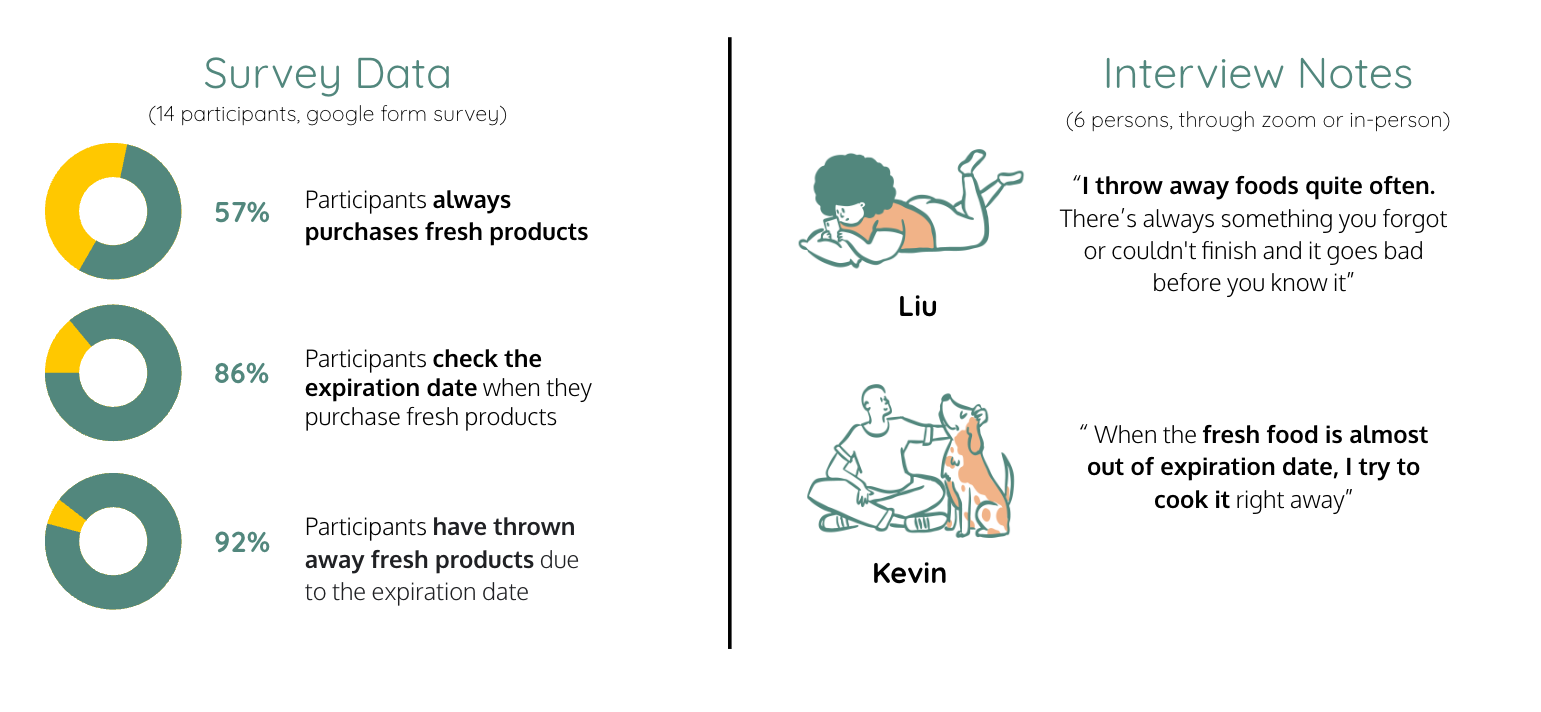
To understand the grocery shopping and food management habit of our potential users, we conducted an interview with 6 people. We also created a survey on the same issue and 14 people participated.
Questions asked to the users:
  • Do you keep a shopping list?
  • Have you ever bought something you already have in your pantry/fridge?
  • How do you track the freshness of your food?
  • How often do you find yourself having to throw out the food after the expiration date?
  • How do you organize your pantry/fridge?
  • How do you decide what to cook?
  • What feature would be useful to you in a recipe app? Why?
 I throw away foods quite often. There’s always something you forgot or couldn't finish and it goes bad before you know it! – Kevin
Survey
According to our survey data, 92% of participants have experience of throwing away foods due to expiration date, and 86% have answered that they check the expiration date when purchasing fresh products. All of our interview participants have been frequently throwing away foods although they’ve been trying to use up items before the expiration date.
Competitor Analysis
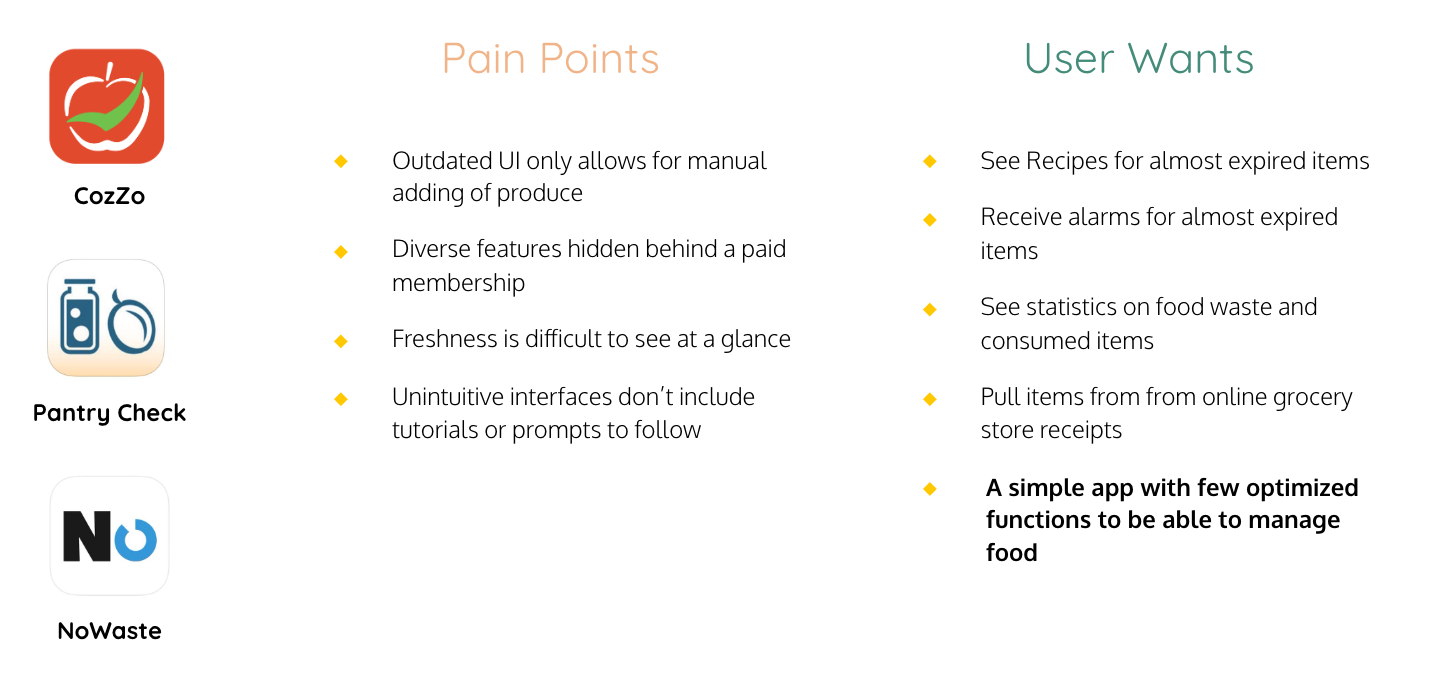
We’ve analyzed the three most popular food management apps. Those were Cozzo, Pantry Check, and NoWaste. The common complaint of these apps was outdated, and not intuitive interfaces. Also, diverse features were hidden behind a paid membership. So, we decided to come up with a simple app with optimized functions to be able to manage food.
Definition
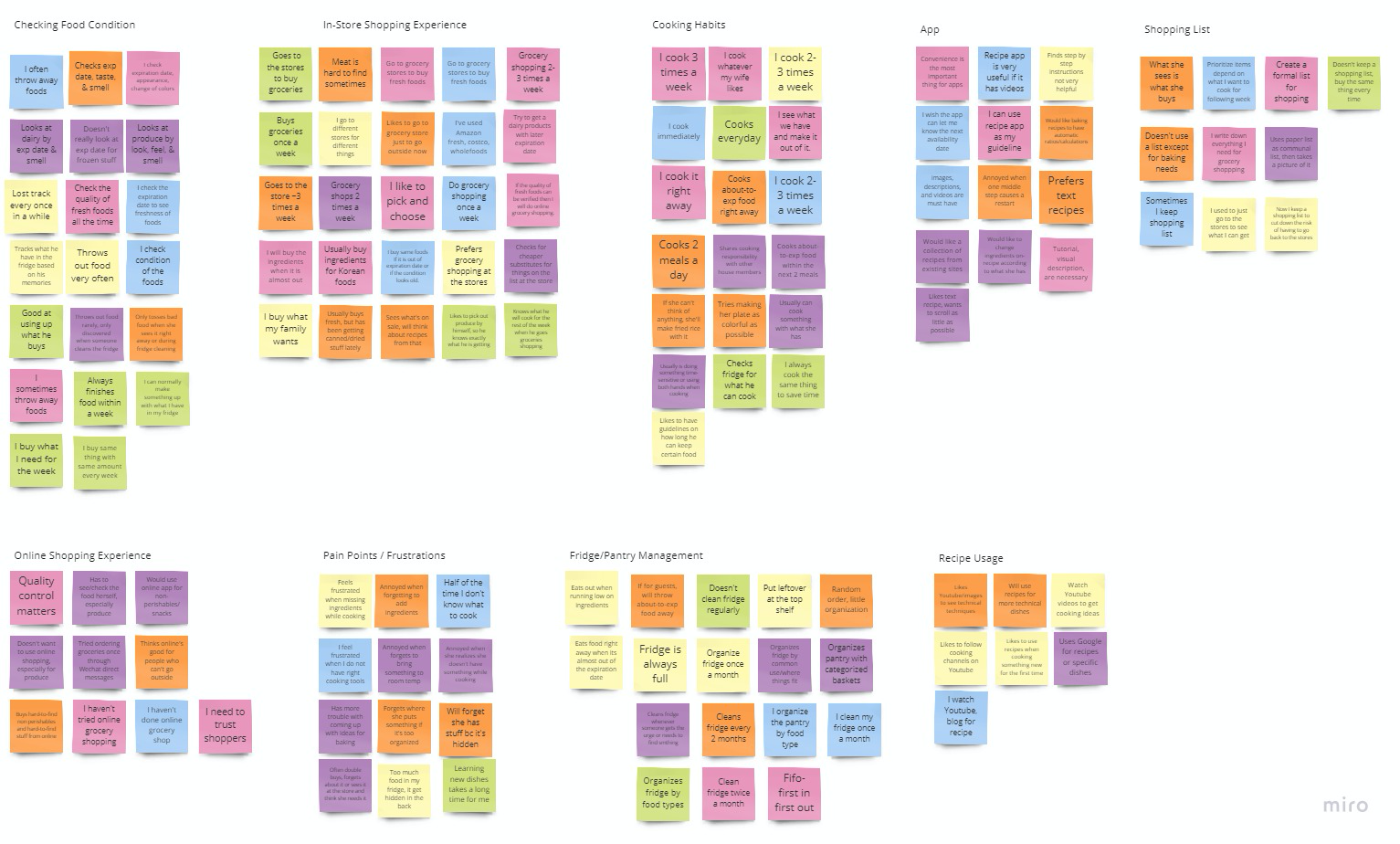
Affinity Mapping
We use affinity diagram to sort and identify user insights in data to synthesize multiple types of data, identify underlying pattern and to better understand users' pain points.
Through user interviews and surveys, we discovered that almost everyone has experienced having to throw away food (93% of 14 surveyed users, 100% of 6 interviewed users).
Therefore, we believe that people often experience food waste due to disorganization and forgetfulness, and that we might be able to help if we help them organize their spaces and remind them to use up their ingredients.
We might do this by letting users create organization spaces and reminder systems customized to their situation. Doing this will allow our product to prevent users contributing to food waste and leaving a positive impact on both their finances and the environment.
Meet Nick
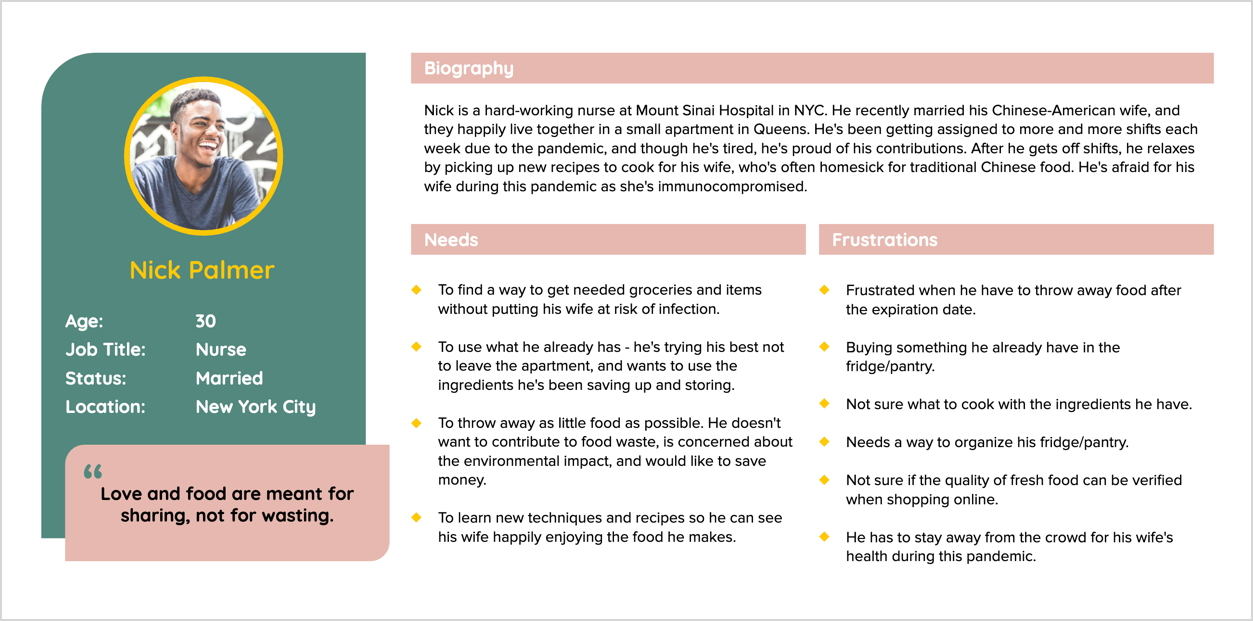
Based on our research, we consolidated our findings and created a user persona.
During this pandemic, our user, Nick, is trying his best to stay at home. So he wants to use up the ingredients he's been saving up and he is frustrated when he finds spoiled food at the back of his fridge. Nick wants to throw away as litdtle food as possible so he needs to find a way to manage his fridge and pantry. He thinks “Love and food are meant for sharing, not for wasting.”
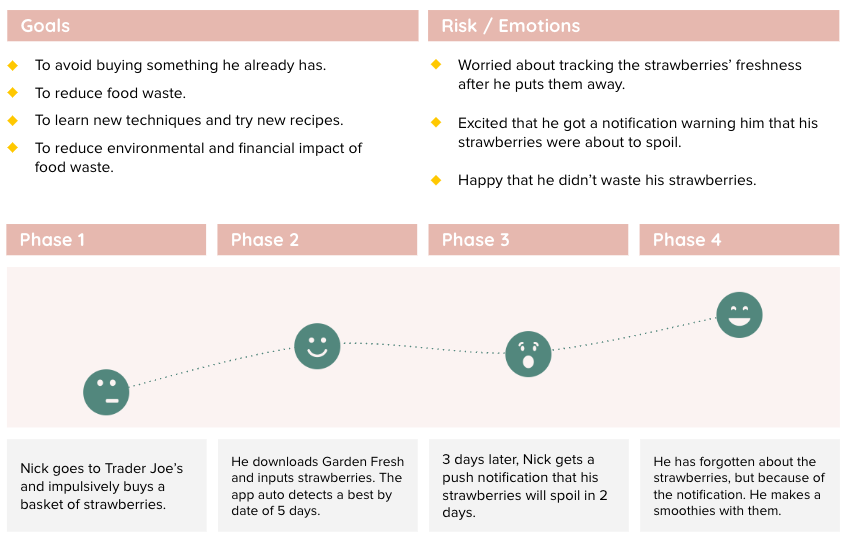
User Scenario
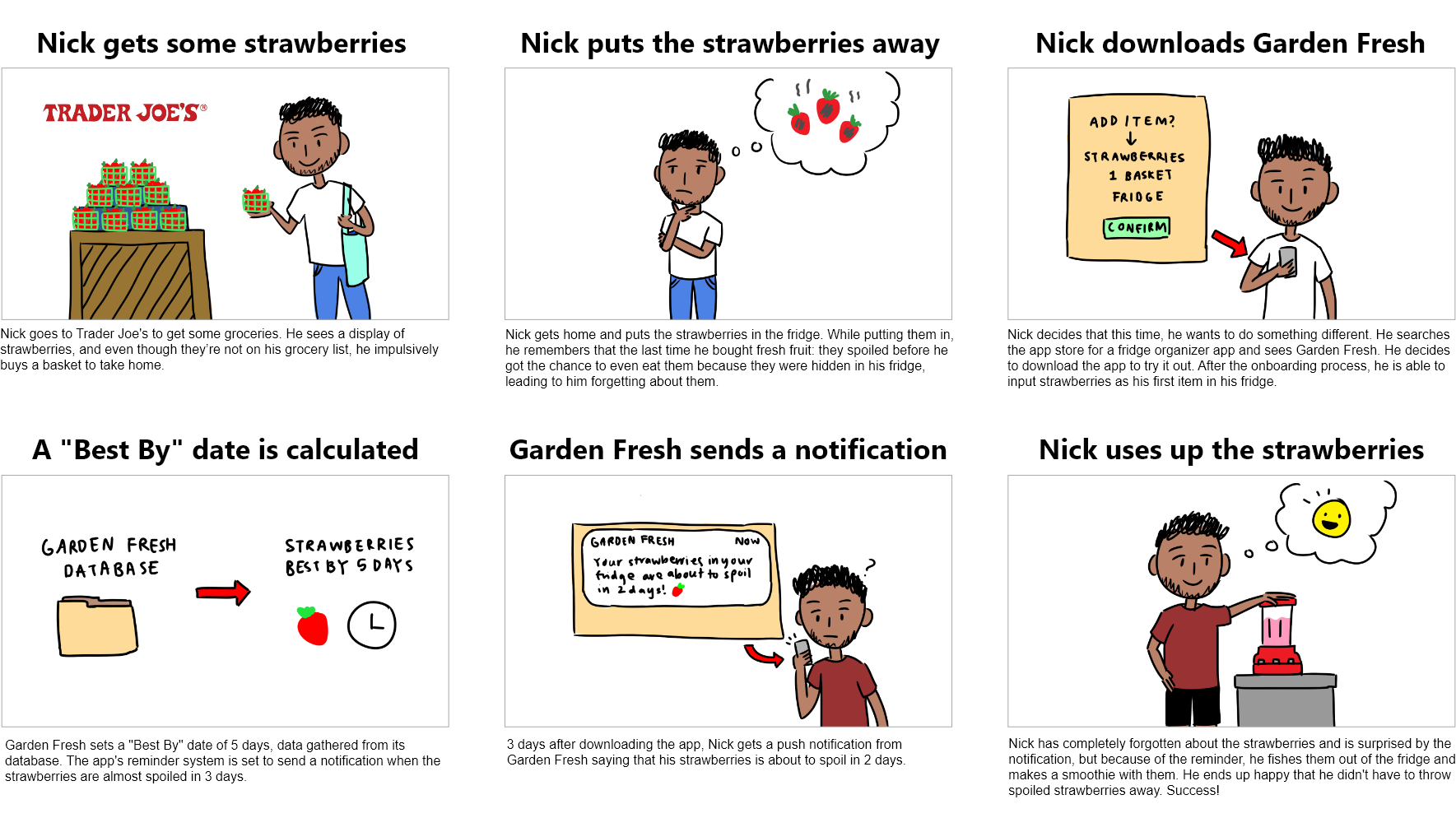
To further define what our persona wants and needs to fulfill, we created a user scenario and storyboard to help us visualize our user’s experience.
Ideation
I Like, I Wish, What If
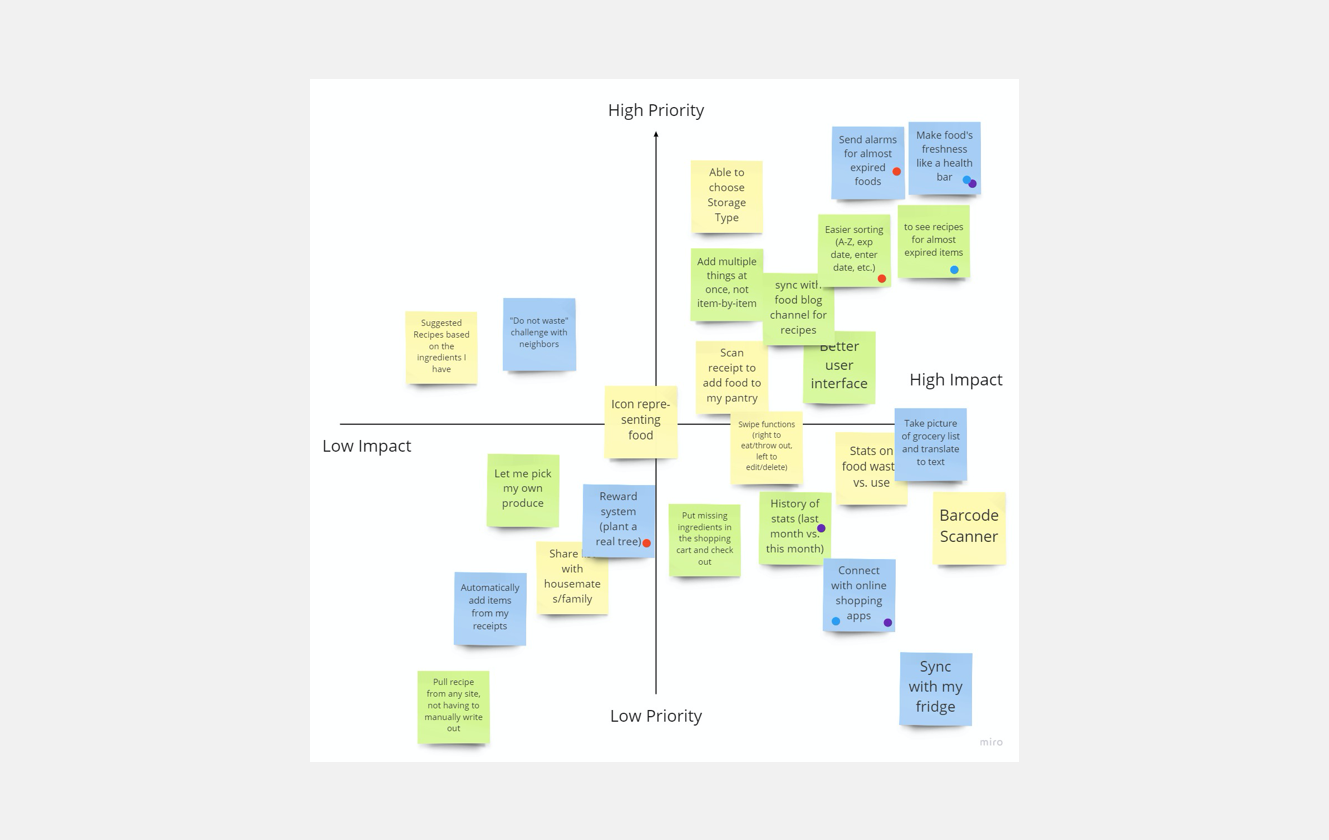
We began to brainstorm as many unique ideas as possible using I Like, I Wish, What If method on Miro board. And further analyse our ideas using feature prioritization matrix to understand which of our ideas are most feasible.
Storyboard
We also create a storyboard to help us better understand the flow of users' interaction with our mobile app.
User Flow
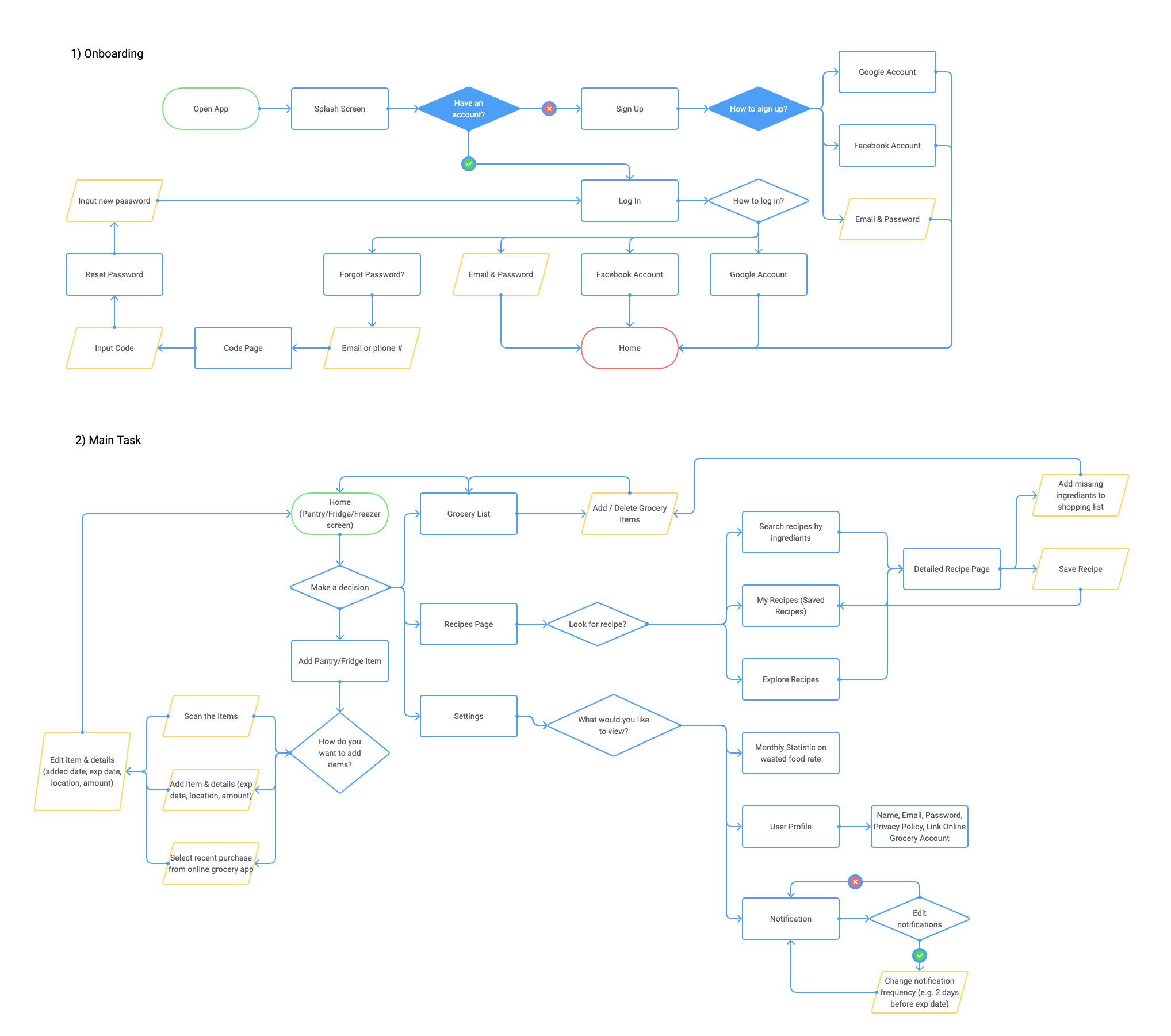
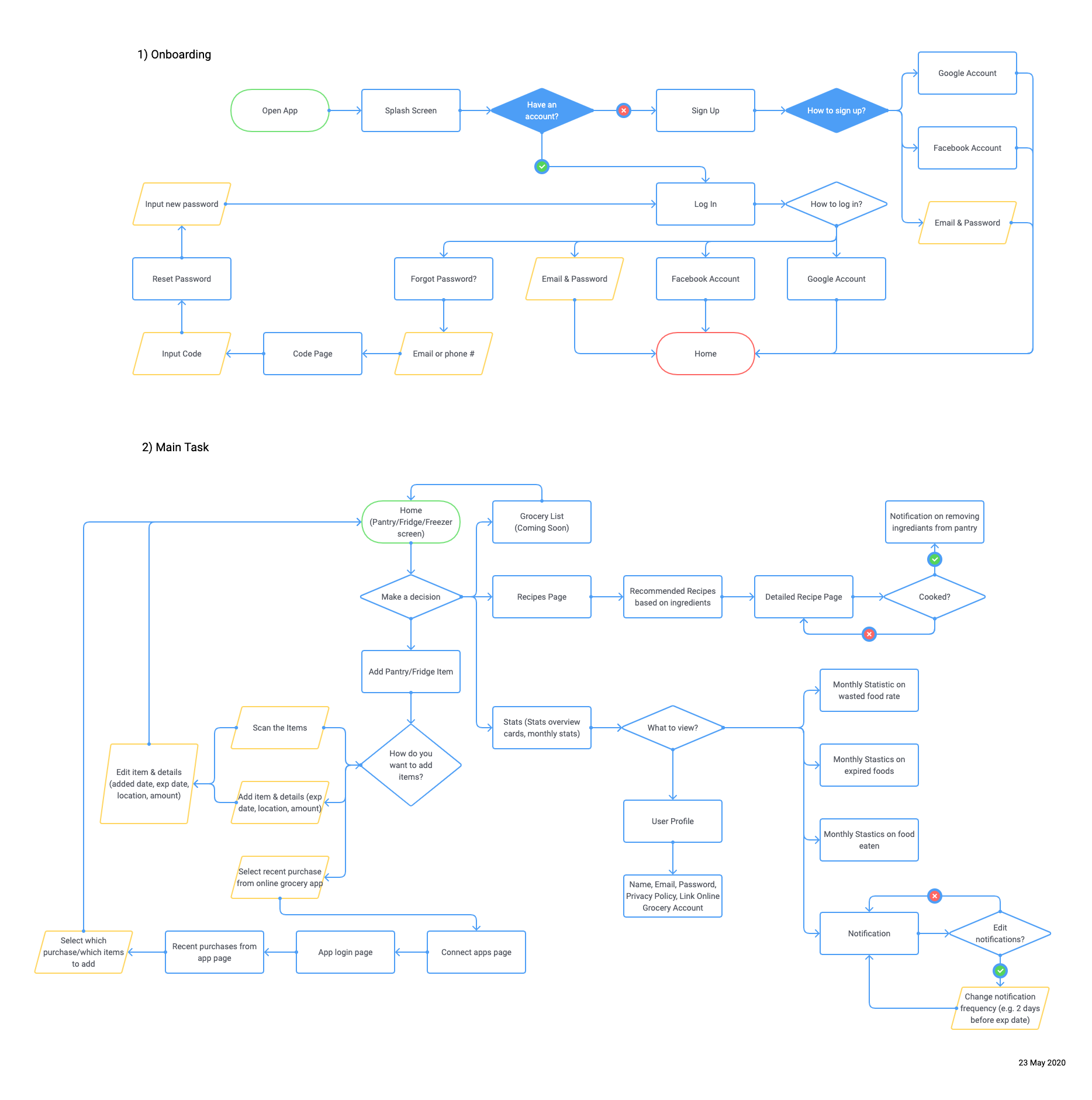
We divided the flow into two parts: onboarding and app functions and planned four possible routes: food organization with 3 methods of adding items, a recipes page integrated with a shopping list, and a profile page listing statistics.
Lo-fidelity prototype
Wireframes
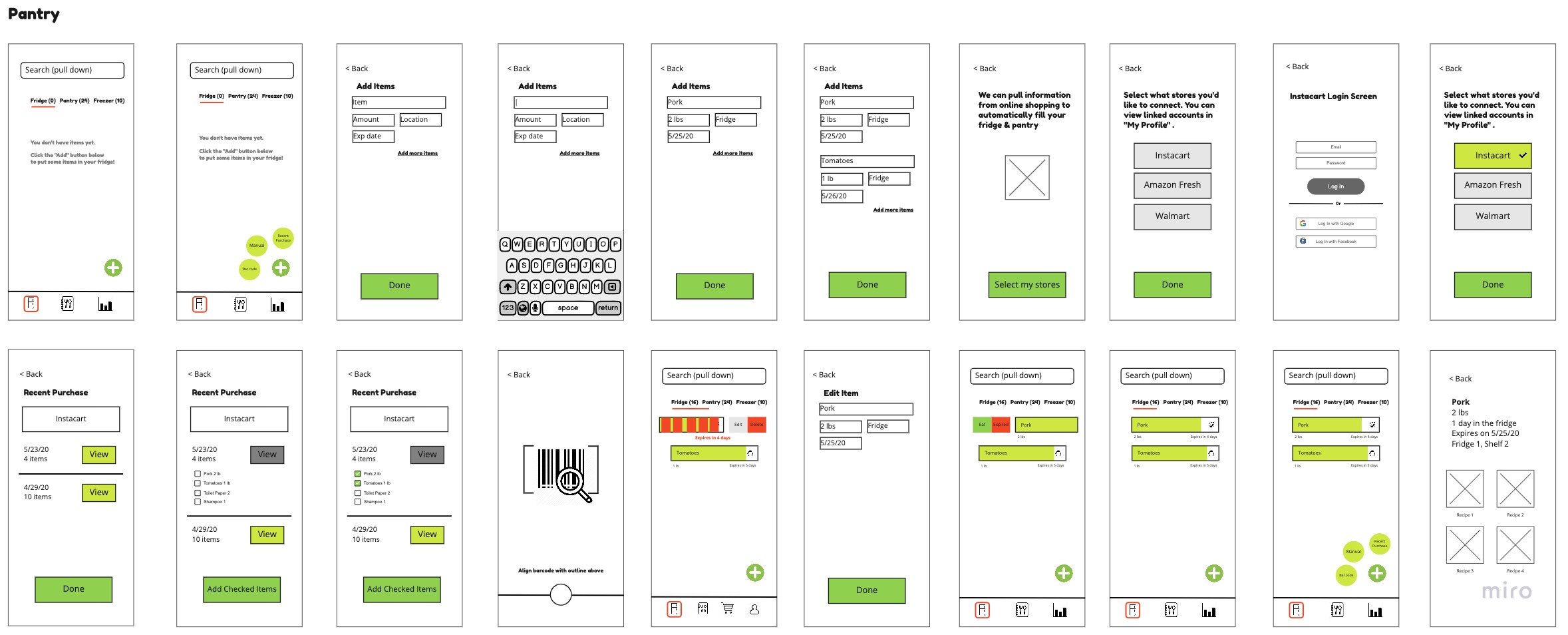
We first individually created paper wireframes to brainstorm concepts about the layout, then consolidated these ideas into digital wireframes using Miro.
User Testing
We then created Lo-Fi Prototype on Invision and conducted user testing with three people. Based on their comments, we created a prioritization matrix and sorted out high-priority and high impact feedback.
Some of our feedbacks are:
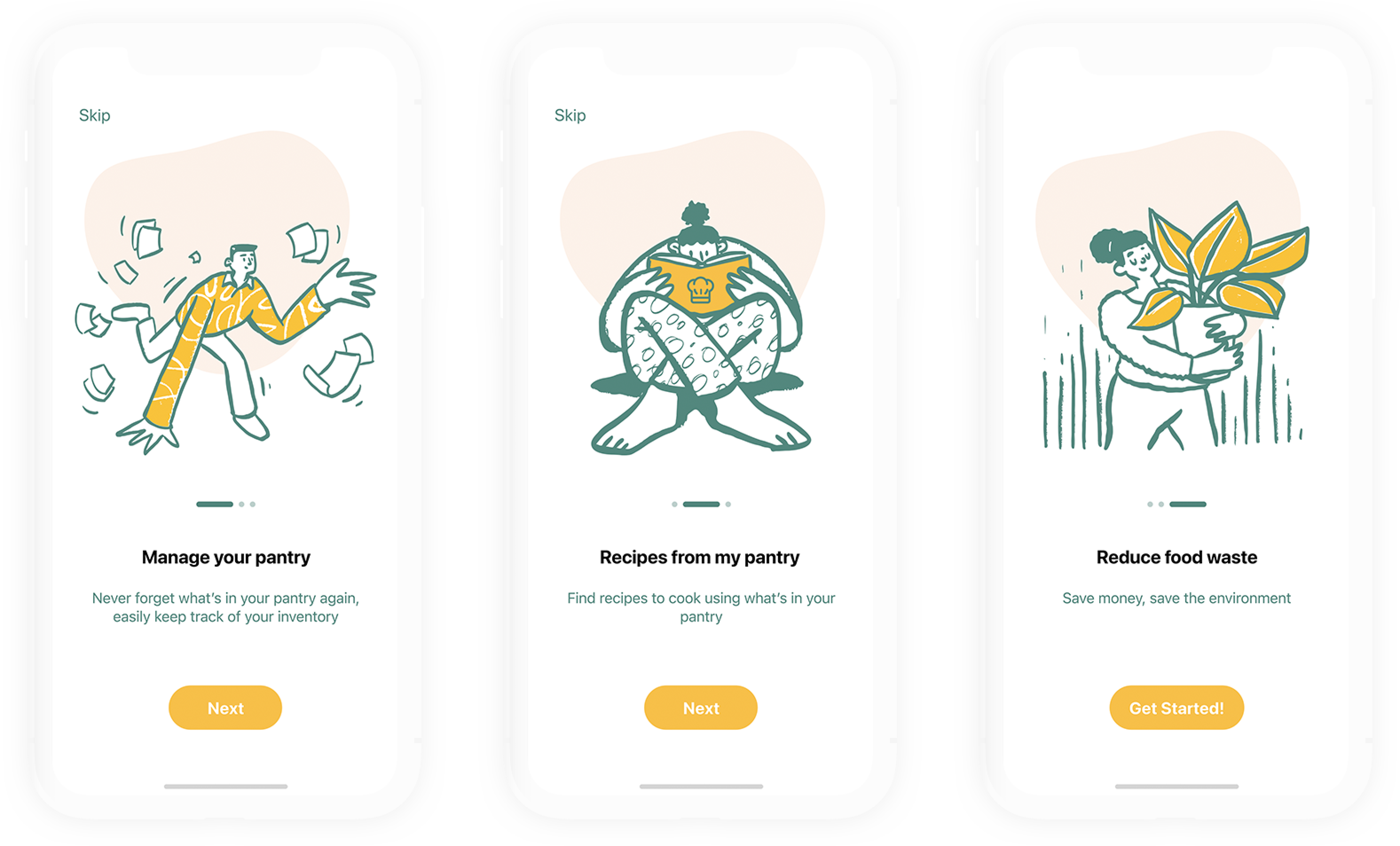
  • Make onboarding process simple and easy to follow.
  • Add the logo and show instruction about the app.
  • Focus on the core purpose of the app (adding & removing foods).
  • Show statistics in more intuitive way.
Back to User Flow!
We have improved the onboarding process by adding a logo, and graphics. We also eliminated low priority, low impact features such as shopping cart and reduced user flow steps to improve accessibility.
Key features
01. Organize Produce
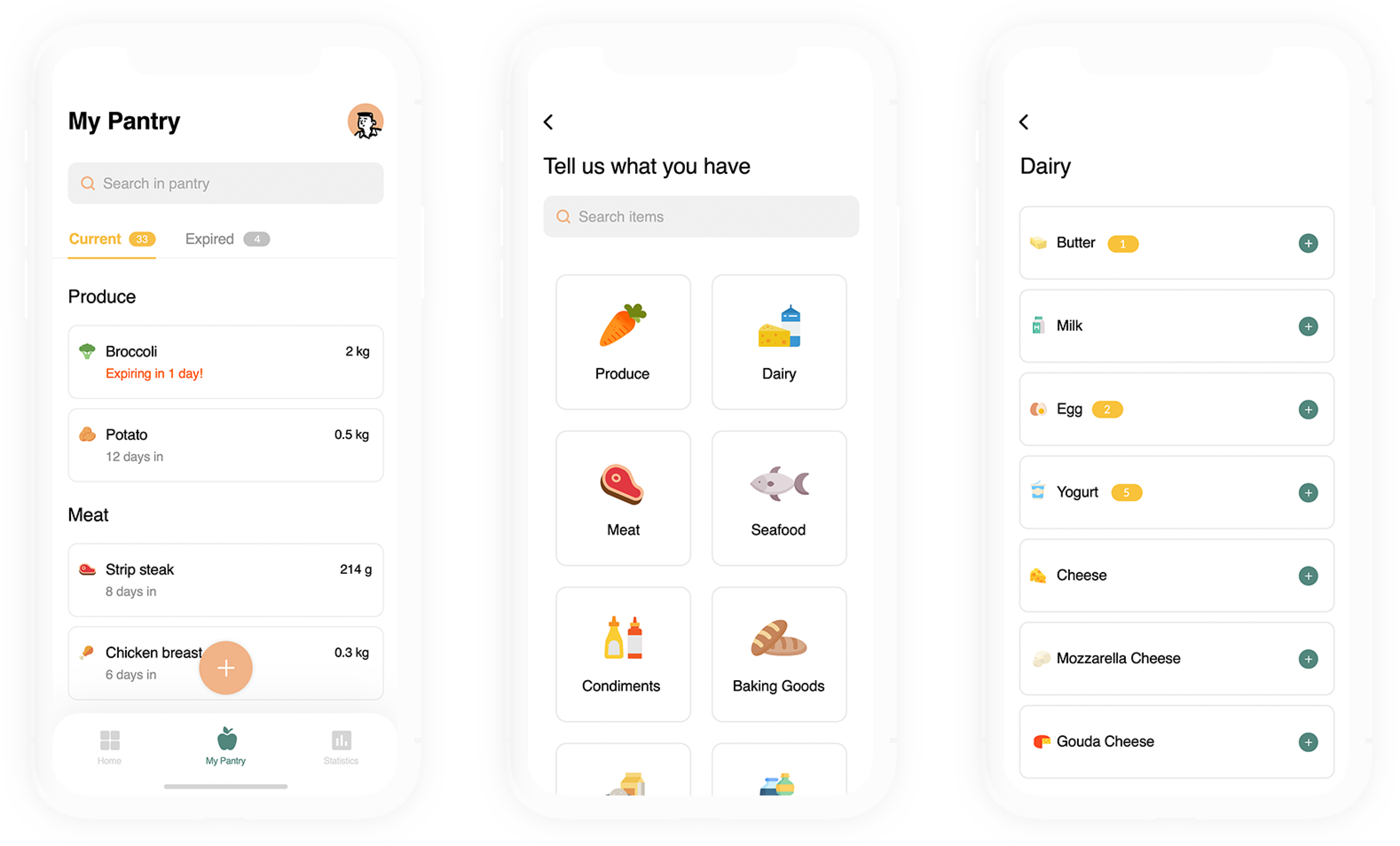
The Pantry screen gives users an overview of their fridge, pantry and freezer. Users can track what they have and see when it expires. We created an intuitive interface in the form of a progress bar informing the user whether a product is still good or it should be thrown away.
Users can easily add food items using barcode scan, pull data from online grocery purchases as well as manually type it in. Garden Fresh also performs inventory check-ups and sends expiry reminders to minimize food spoilage.
02. Cook Recipes
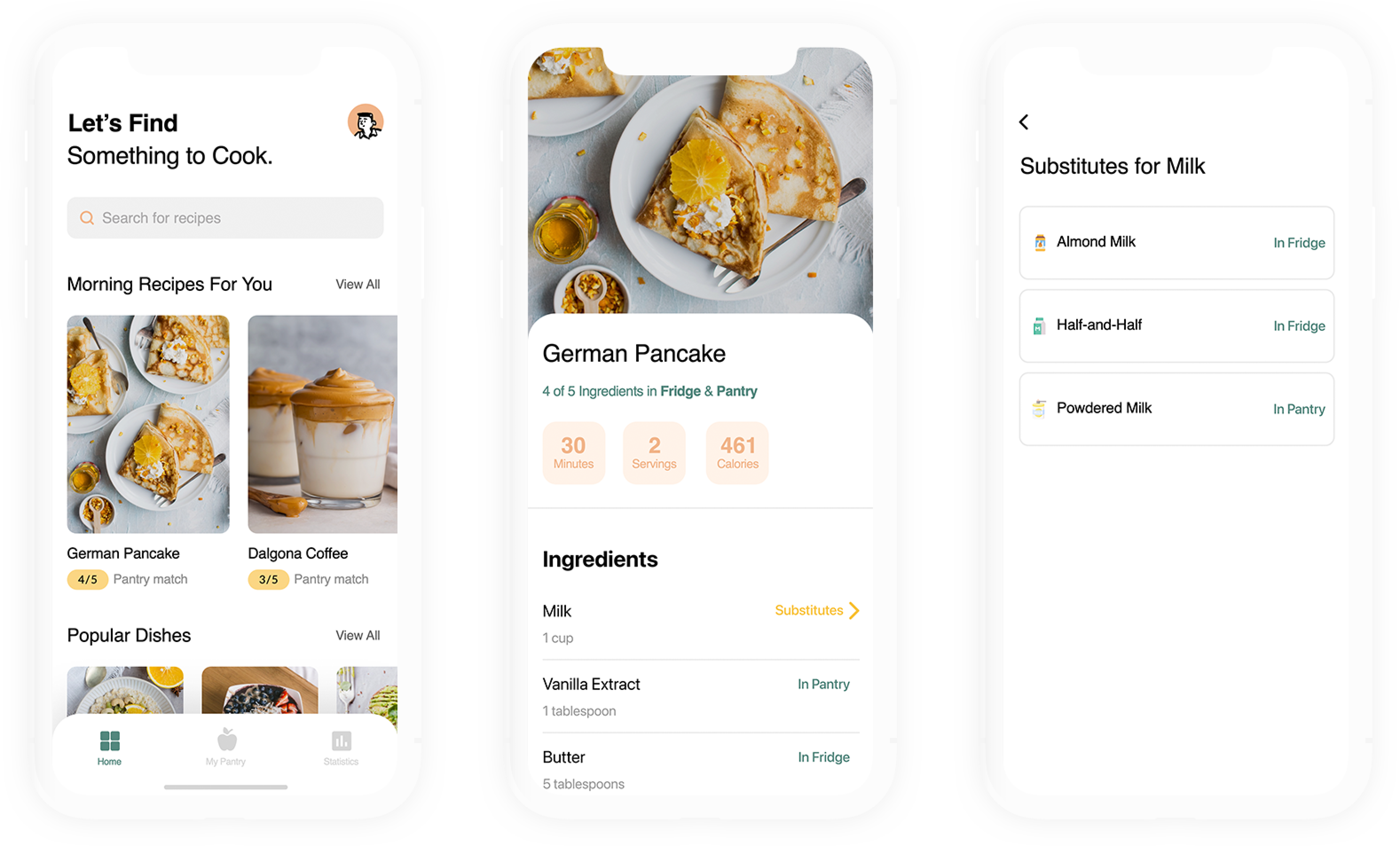
The Recipes screen allows users to find recipes based on the ingredients they have from their inventories and instantly shows them what can be cooked. This is a feature to help users use up as much of their existing food as possible.
03. Track Statistics
The Statistics screen displays a daily, weekly, monthly percentage of food waste as well as number of expired and consumed products. Users can use past inventory insight for future purchases in order to create lasting good habits of preventing food waste.
High-fidelity prototype
Onboarding
My Pantry
Recipes
Future plan
In our future plan, we have high priority action items and features that would be nice to have eventually.
To further reduce friction of adding items, we’d like to create a database of food expiration data so that we can automatically populate expiration dates for produce. We would also like to introduce a grocery list back, and for this list to be able to integrate with online grocery accounts.
Some features that would be nice to see in the app is to expand the statistics portion, specifically with financial savings - this number may be more impactful to users, but we would have to conduct further research on how to calculate these savings. Finally, we would like to create an option to share fridge and pantry spaces with house members - this allows others to collaborate and view common food spaces and contribute to using up food items and preventing food spoilage. it's good to be ambitious, but we shouldn't sacrifice quality and spread ourselves thin just to have as many features as possible.